Good News: The SAAHIP 2027 Conference abstract deadline has been extended to 13 November 2026.


How to submit your abstract for the SAAHIP 2027 Conference
 Written BySAAHIP Team
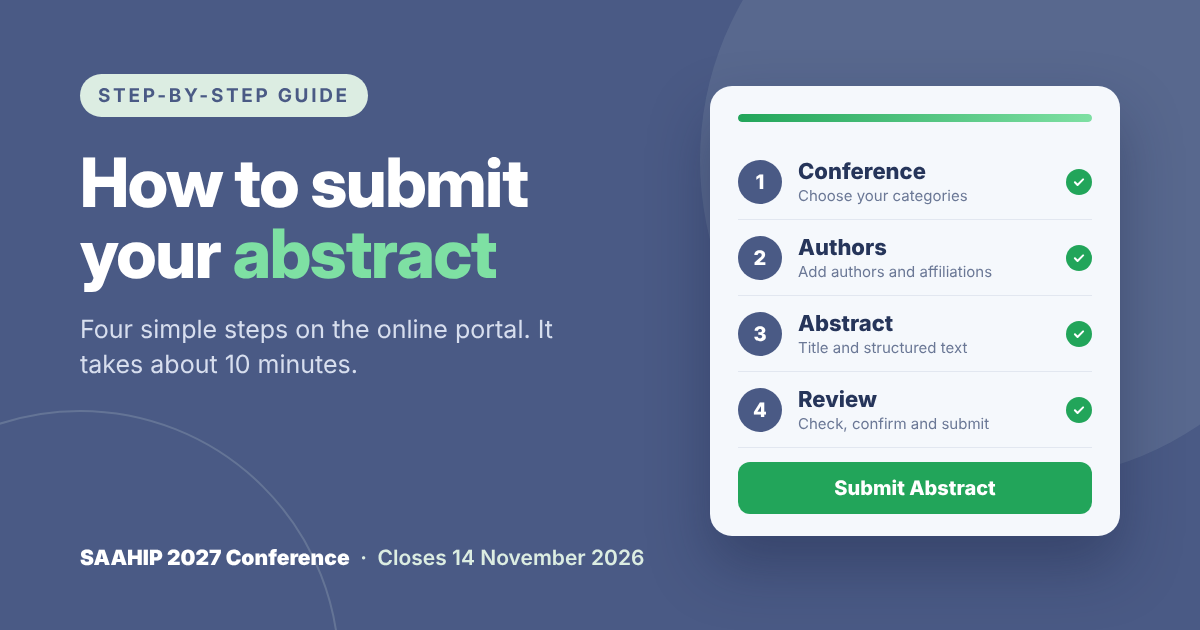
How to submit your abstract for the SAAHIP 2027 Conference
A step-by-step guide to the online abstract portal
Submitting your abstract takes about 10 minutes. The portal guides you through four short steps: choose your categories, add your authors, enter your abstract, then review and submit. This guide walks through each step with screenshots so you know exactly what to expect.
Closing date: Saturday, 14 November 2026 at 23:59. Portal: conference.saahip.org.za/submit-abstract
| Note: The screenshots use made-up example authors and an example abstract. Replace them with your own details when you submit. |
Before you start
Have the following ready. It is easiest to draft your abstract in Word first and then copy each part into the form.
- Your topic category: the one of seven categories that best fits your work.
- Your presentation category: podium, poster, scenario or quality improvement, pearl, or workshop.
- Your abstract text: structured under the headings for your presentation category, with a maximum of 350 words (the title, authors and affiliations are not counted).
- A title: brief, in lowercase except for the first word and proper nouns.
- All authors, in order: first name, surname and at least one affiliation for each.
- The presenting author’s details: email address and mobile number, plus their PSSA number and SAAHIP branch if they are a member.
- Supporting documents, if applicable: for example an ethics clearance certificate (DOCX, DOC or PDF, up to 5 MB).
Do you need an account?
No. You can submit as a visitor and give your email address at the last step. A free account is worth creating, though: it lets you track your abstract’s review status, receive the committee’s decision and book your conference ticket in one place.
If you are not signed in, the portal shows a short prompt with two buttons: Create a free account first and Sign in first. Your abstract is kept while you sign in or register, so you won’t lose any work.
Step 1: Choose your conference and categories
Open the submission portal. Step 1 is called Choose your conference. The progress bar at the top shows how far you are, and the four tabs (Conference, Authors, Abstract, Review) let you move between steps.
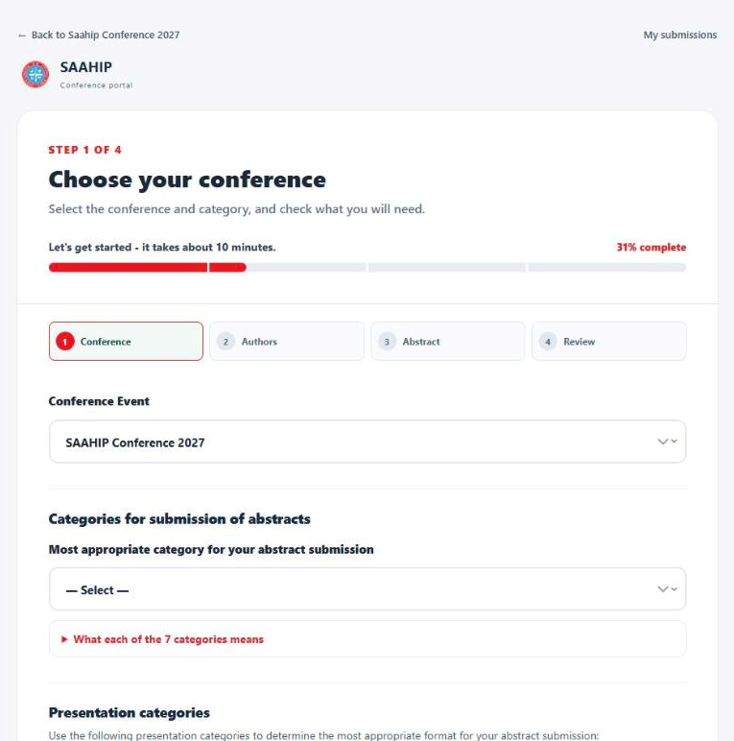
Figure 1. Step 1 of the submission form.
- Conference Event: SAAHIP Conference 2027 is already selected. Leave it as it is.
- Most appropriate category for your abstract submission: choose the topic that best fits your work. A short description appears under your choice. Click What each of the 7 categories means to compare them all, and use the Choose buttons to pick one.
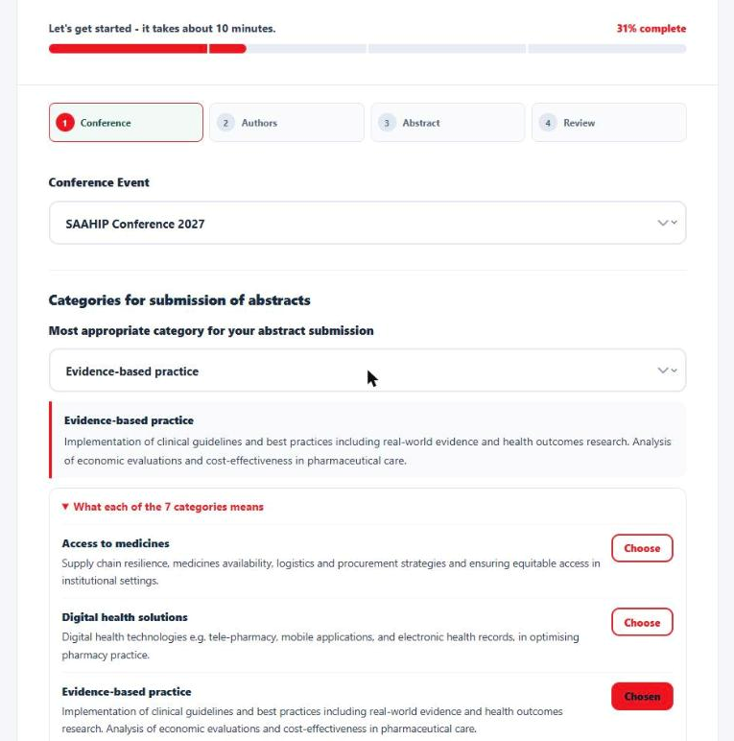
Figure 2. Choosing a topic category. The description of your choice appears underneath.
The seven topic categories are:
| Category | What it covers |
| Access to medicines | Supply chain resilience, medicine availability, logistics and procurement, and equitable access in institutional settings. |
| Digital health solutions | Tele-pharmacy, mobile apps, electronic health records and other digital tools that improve pharmacy practice. |
| Evidence-based practice | Clinical guidelines and best practice, real-world evidence, health outcomes research and economic evaluations. |
| Legislative readiness | Navigating current and future legislation, regulation and policy in South Africa. |
| Patient-centred care | Preventing and managing communicable and non-communicable diseases, e.g. pharmacotherapy, pharmacogenomics, vaccines, adherence and counselling. |
| Sustainable resource management | Delivering services under high demand, limited resources and staff shortages. |
| Other | Any other topic of interest to hospital and institutional pharmacy in South Africa. |
- Presentation category: choose how you would like to present. The description of the format appears under your choice, and What each of the presentation categories means lets you compare them.
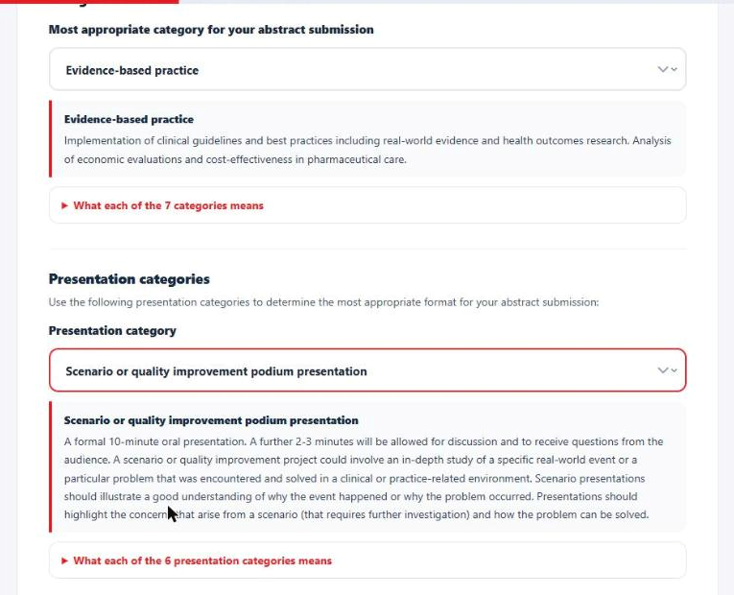
Figure 3. Choosing a presentation category.
- Abstract submission guidelines: click Read the abstract submission guidelines and read them carefully. Abstracts that don’t follow the guidelines won’t be considered. Then tick I have read and understood the abstract submission guidelines.
- What you will need: this box updates to show the abstract headings for the presentation category you chose. Check it, then click Continue.
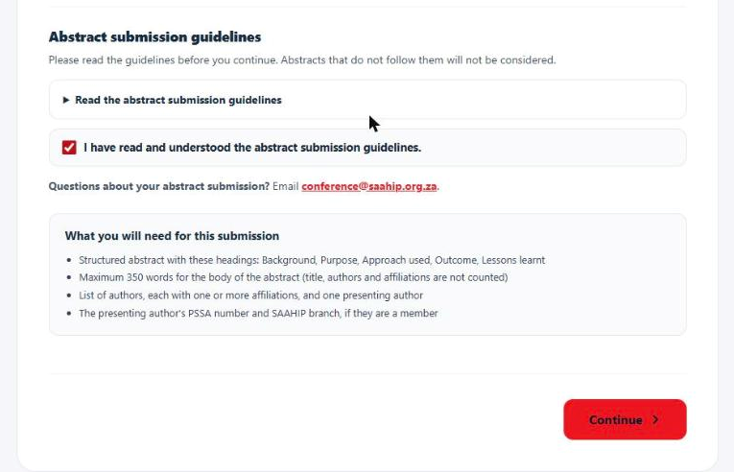
Figure 4. Confirm the guidelines, check what you will need, then continue.
| Tip: Your presentation category decides which headings appear in Step 3, so choose it before you start writing. If you change it later, go back to Step 1 and check your abstract again. |
Step 2: Add the authors
List every author in the order they should appear in the programme and abstract book.
- Author 1: enter the first name(s) and surname. The portal fills in your account details here if you are signed in. You don’t have to be the first author.
- Presenting author: select Presenting author next to the person who will present at the conference. Their email address and mobile number are required.
- Affiliations: enter the department, institution, city and country, e.g. Department of Pharmacy, Example Provincial Hospital, Pretoria, South Africa. Click + Add another affiliation for this author if they have more than one.
- More authors: click + Add another author (up to 20 authors). Use the up and down arrows to change the order, or Remove to delete an author. Email and mobile are optional for authors who are not presenting.
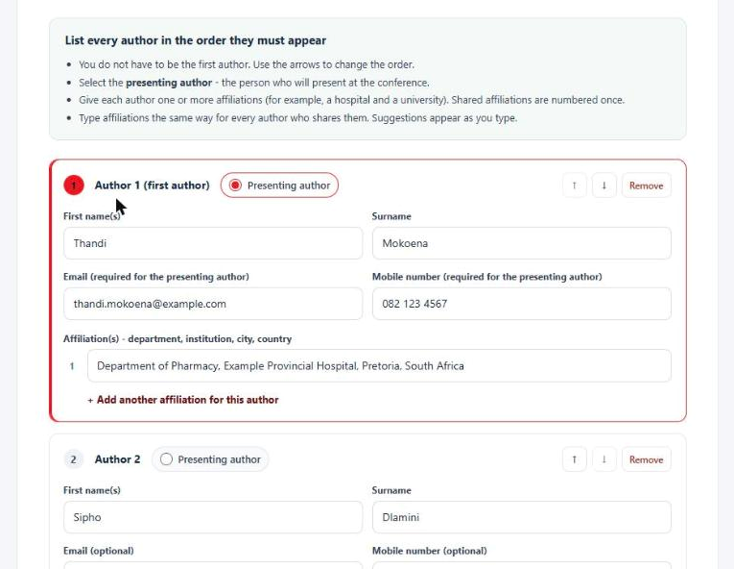
Figure 5. Adding authors. The first author is marked as the presenting author.
| Tip: Type shared affiliations exactly the same way for every author. The portal then numbers them once. Suggestions appear as you type to help you keep them consistent. |
- Check the preview: the preview box shows how the authors and affiliations will appear in the programme and abstract book. The presenting author is underlined.
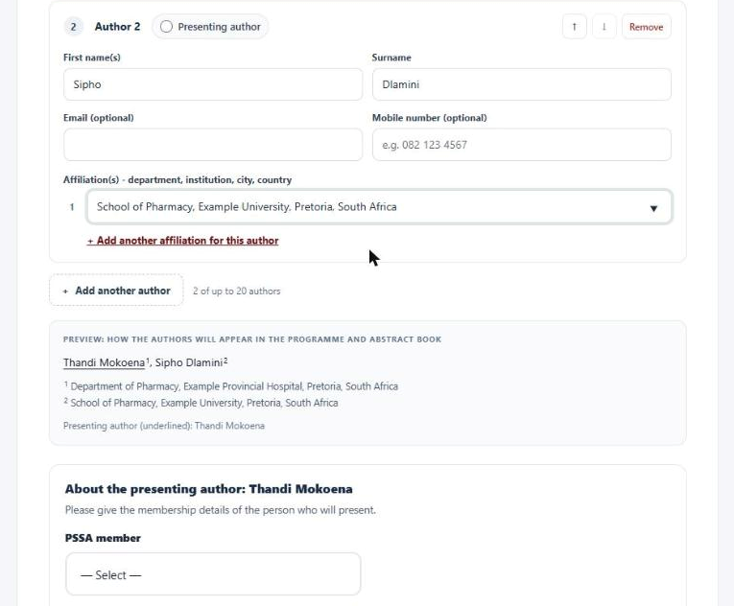
Figure 6. The preview shows how the author list will be printed.
- About the presenting author: say whether the presenting author is a PSSA member and, if so, enter their PSSA number. Then say whether they are a SAAHIP member and, if so, choose their SAAHIP branch. Click Continue.
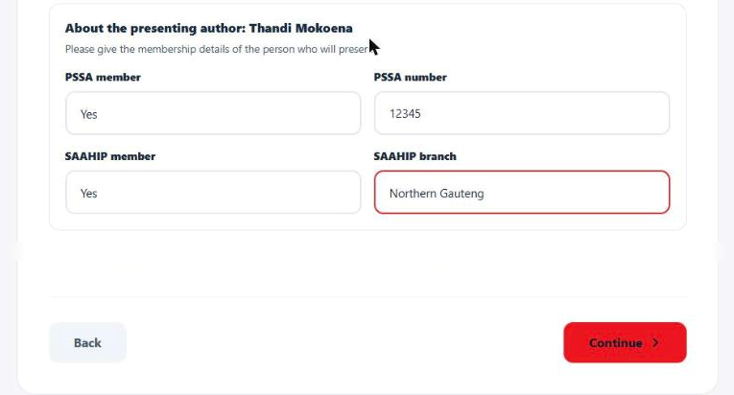
Figure 7. Membership details of the presenting author.
| Why it matters: Only paid-up SAAHIP members qualify for the conference awards, so give the correct membership details. |
Step 3: Enter your abstract
Type or paste your abstract into the form. What you enter here is exactly what reviewers read and what is printed in the programme and abstract book.
- Abstract title: enter the full title. Keep it brief and clear. Use lowercase, capitalising only the first word and proper nouns (such as a place or organisation), and try not to start with “A”, “An” or “The”. The title can be up to 300 characters.
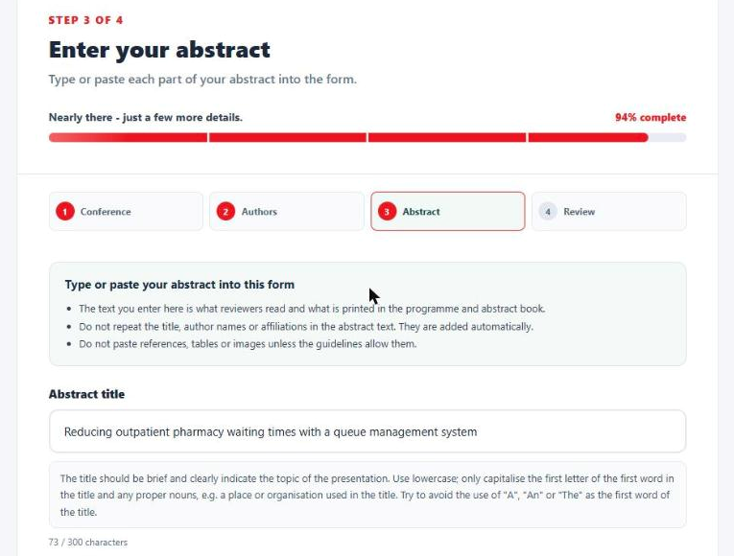
Figure 8. Entering the abstract title. The title guidance appears below the box.
- Abstract sections: a box appears for each heading of your presentation category. Fill in every box. The word counter below the last box shows how many of your 350 words you have used.
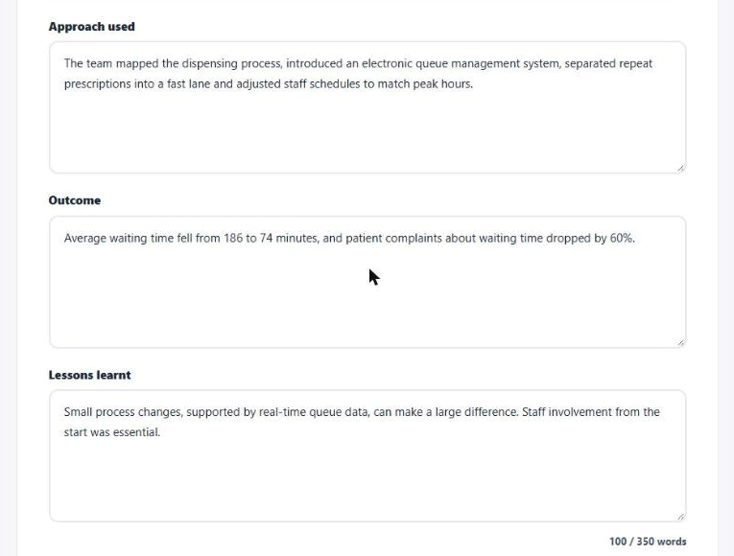
Figure 9. The abstract sections for a scenario or quality improvement presentation, with the word counter.
The headings depend on the presentation category you chose in Step 1:
| Presentation category | Abstract headings |
| Podium, poster, or podium or poster | Background, Objective/s, Methods, Results, Conclusion |
| Scenario or quality improvement podium | Background, Purpose, Approach used, Outcome, Lessons learnt |
| Pearl | Background/Motivation, Lessons to learn, Key message/s |
| Workshop, symposium or seminar | Background and rationale, Objectives, Contents and approach, Target audience, Expected outcomes |
- Supporting documentation: where applicable, click Choose File and upload your ethics clearance certificate (DOCX, DOC or PDF, one file, up to 5 MB). Then click Continue.
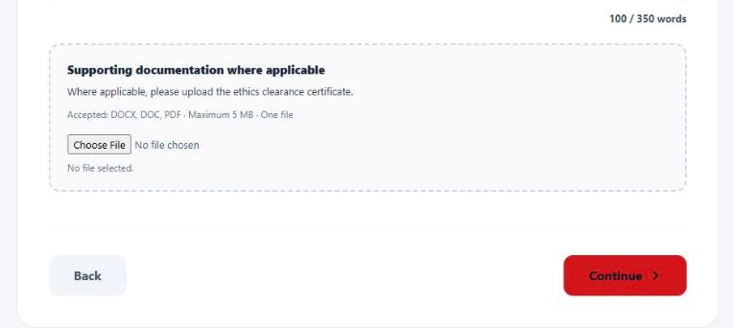
Figure 10. Uploading supporting documentation, such as an ethics clearance certificate.
| Avoid these common mistakes: Don’t repeat the title, author names or affiliations in the abstract text, because the portal adds them automatically. Don’t paste references, tables, graphs or images. |
Step 4: Review and submit
The last step shows your whole submission exactly as it will appear in the abstract book. Read it carefully.
- Check the summary: confirm the conference, your topic category, presentation category, the presenting author’s PSSA and SAAHIP details, and any uploaded file.
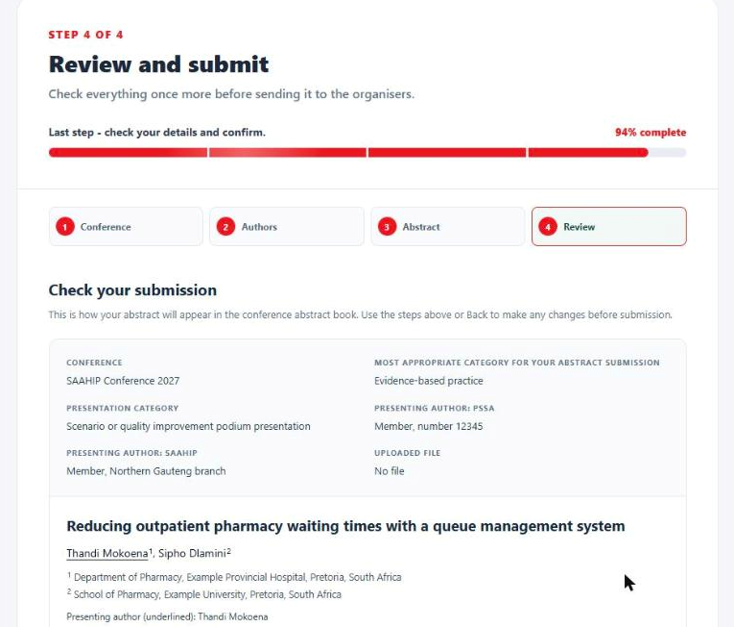
Figure 11. The review page summarises your choices and shows the formatted abstract.
- Check the abstract: read the title, authors, affiliations and each section. To fix anything, click Back or one of the step tabs at the top. Your entries are kept.
- Confirm: tick I confirm that all authors have approved this abstract and that the author order, affiliations and presenting author are correct.
- If you are not signed in: enter your email address. Confirmations and the committee’s decision will be sent there.
- Submit: click Submit Abstract.
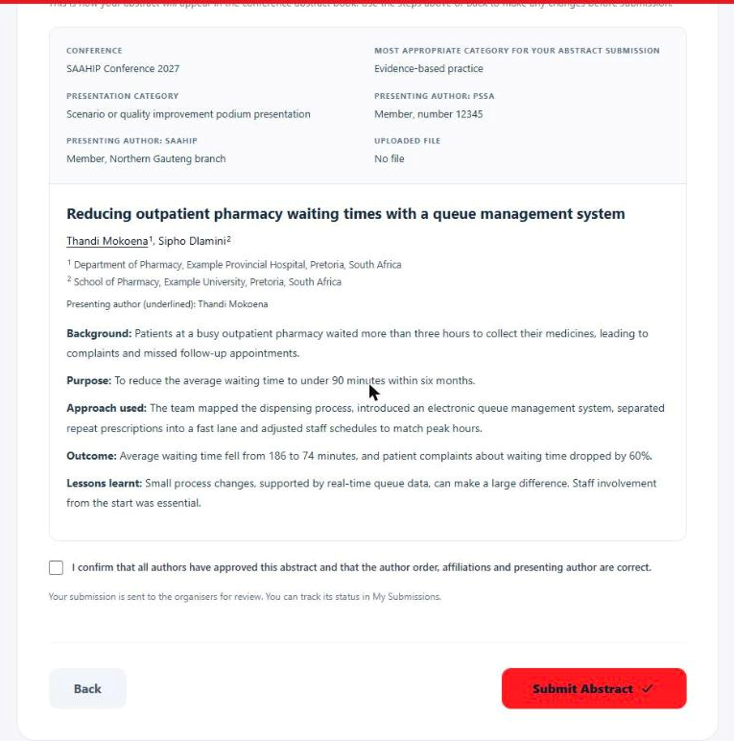
Figure 12. Confirm the abstract and click Submit Abstract.
After you submit
- Track your abstract: if you have an account, open My submissions (top right of the portal) to see the status of your abstract.
- Review (15–30 November 2026): the Scientific Committee reviews every abstract and assigns accepted abstracts to the most suitable session.
- Outcome (1 December 2026): the corresponding author receives the outcome by email.
- If accepted: to present, return the signed acceptance document and pay the conference registration fee. Presenters do not receive an honorarium, and travel and accommodation are not covered.
- The conference: 11–14 March 2027.
Key dates
| What | When |
| Abstract submissions close | Saturday, 14 November 2026, 23:59 |
| Abstract review | 15–30 November 2026 |
| Authors notified of outcome | Tuesday, 1 December 2026 |
| SAAHIP 2027 Conference | 11–14 March 2027 |
Need help?
Email questions about your submission to conference@saahip.org.za. Start your submission at conference.saahip.org.za/submit-abstract.
We look forward to reading your abstract!